

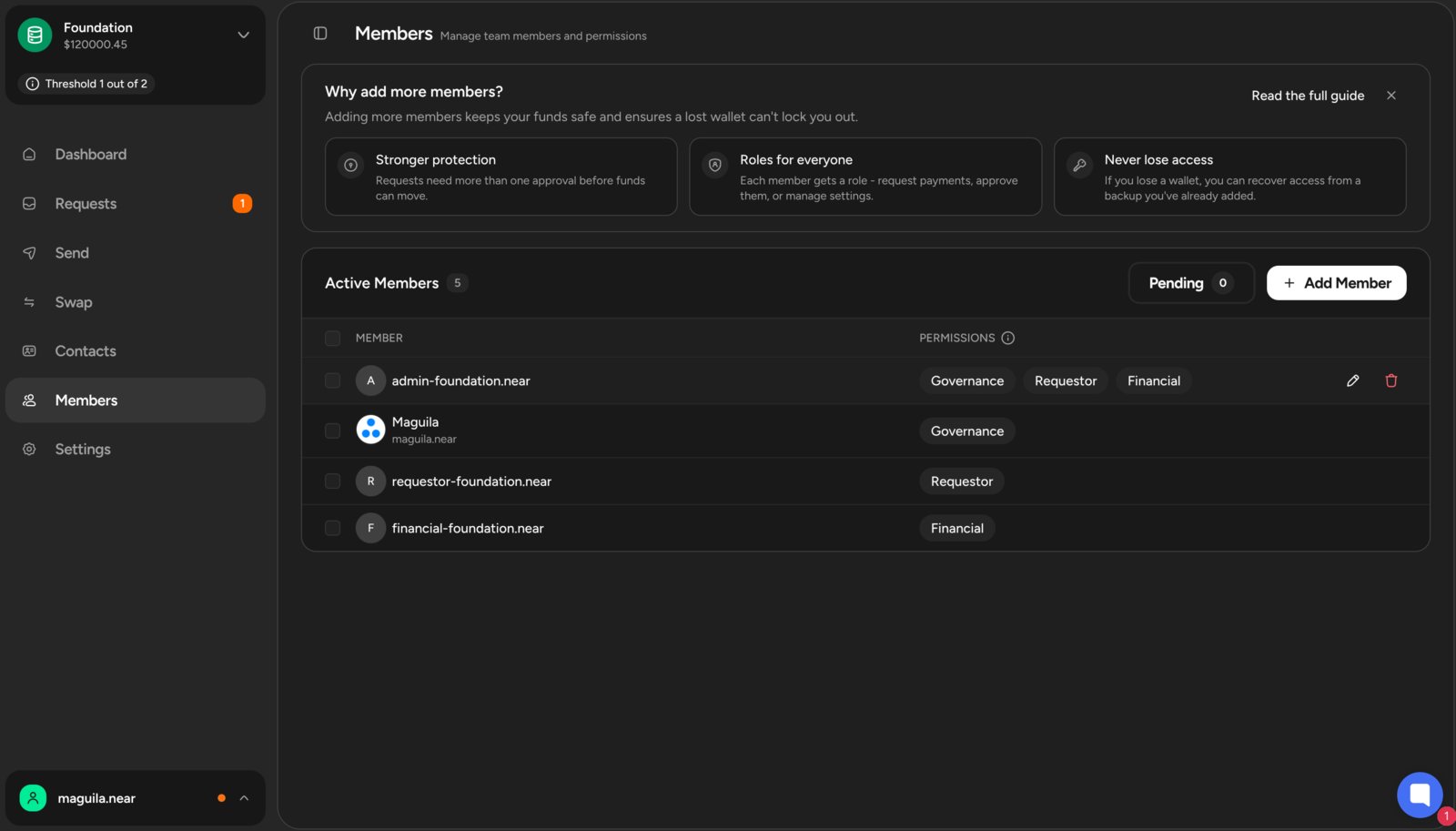
You can manage team members and their roles in the
Members section of the left sidebar.Members
A treasury member represents a wallet address that can participate in the treasury. Each member:- Connects using their own wallet (e.g. a browser wallet, mobile wallet, or hardware wallet)
- Signs proposals and votes using that wallet
- Acts independently from other members
Roles and Permissions
Roles define what actions a member’s wallet is allowed to perform within the treasury. There are three roles in a treasury: Requestor, Finance, and Governance. Each role has specific permissions that determine what actions members can perform within the treasury.Members can have multiple roles and receive the combined permissions granted by each assigned role.
Requestor
Allows members to create requests related to the treasury’s funds (e.g., treasury transaction requests).Can
- ✅ Create payment requests
- ✅ Create staking, unstaking, and withdrawal requests
- ✅ Create asset exchange requests
- ✅ Delete their own pending requests
Cannot
- ❌ Vote on any request
Finance
Responsible for voting on treasury transaction requests—those created by Requestors.Can
- ✅ Vote to approve or reject requests created by Requestors
Cannot
- ❌ Create, edit, or delete requests
- ❌ Manage members or treasury settings
Governance
Responsible for configuring the treasury’s settings and membership.Can
- ✅ Create requests to add, edit, or delete members
- ✅ Create requests to update the voting duration
- ✅ Create requests to update the treasury’s theme and logo
- ✅ Create requests to update the treasury’s voting threshold
- ✅ Vote on any treasury configuration requests
- ✅ Delete their own requests
Cannot
- ❌ Create financial requests (e.g., payments or staking)
- ❌ Vote on financial requests created by Requestors
Governance Is the Highest-Trust Role
The Governance role controls who has power in the system. Because Governance controls membership and voting rules, it should be treated as the highest-trust role in the treasury. Governance is intentionally powerful and not meant for day-to-day use. Best practice is to:- Assign Governance to highly secure wallets
- Use high voting thresholds
- Share Governance across multiple trusted members when possible
Permission Matrix
The following table shows the actions each role can perform:Best Practices
When assigning roles and permissions within your treasury, consider the following best practices:- Use least privilege: Grant only the roles needed for each member’s responsibilities
- Separate duties: Maintain a clear separation between financial operations and treasury configuration, do not assign the Governance role to Requestors or Finance members
- Use voting thresholds intentionally: Higher-risk actions (like configuration changes) should require more approvals
- Do regular reviews: Periodically review assigned roles and permissions to ensure they align with your treasury’s current needs
- Governance caution: Exercise caution when assigning the Governance role, as this role has extensive control over the treasury’s settings